Automatic Substitute Teacher Scheduling in School Timetable Software
Teacher absences are unavoidable in every educational institution. Whether due to illness, official duties, training programs, examinations, or emergency leave, schools must ensure that classes continue without interruption. Automatic Substitute Teacher Scheduling instantly identifies suitable replacement teachers based on availability, subject expertise, workload limits, departmental preferences, and institutional rules, allowing schools to generate conflict-free substitute timetables within seconds while minimizing administrative effort.
What is Automatic Substitute Teacher Scheduling?
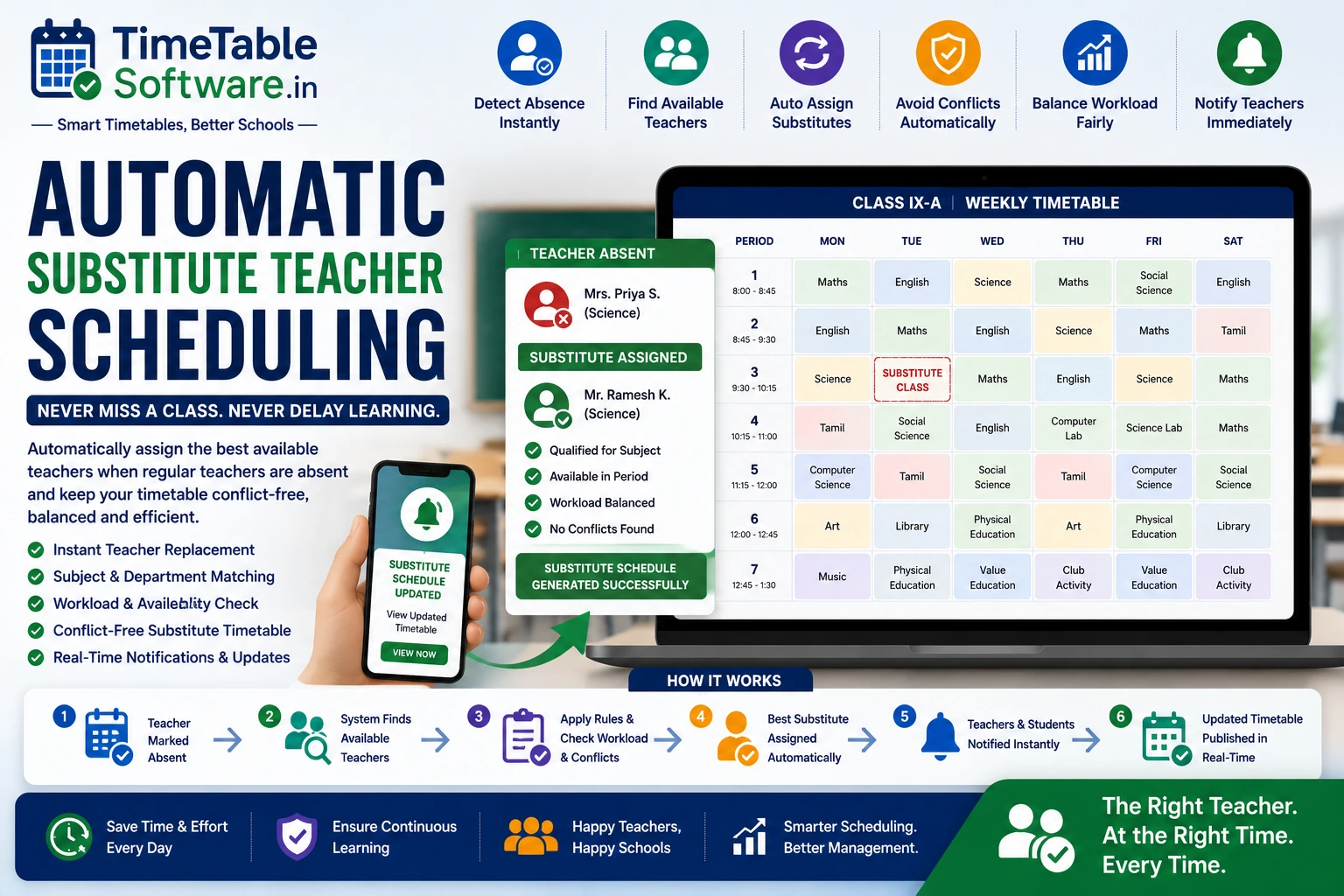
Automatic Substitute Teacher Scheduling is an intelligent timetable feature that automatically assigns replacement teachers whenever a regular teacher is unavailable. Instead of manually searching for substitutes every day, the scheduling engine validates availability, subject qualifications, workload limits, and timetable rules before creating an optimized substitute timetable.
Why Schools Need Automatic Substitute Scheduling
Daily Teacher Absences
Automatically handles sick leave, emergency leave, training programs, meetings, examination duty, and official assignments.
Faster Decision Making
Generates substitute schedules within seconds instead of spending hours searching for available teachers.
Balanced Workload
Distributes substitution duties fairly among eligible teachers while respecting workload limits.
Academic Continuity
Ensures students continue learning without unnecessary class cancellations.
Challenges of Manual Substitute Timetable Preparation
How Automatic Substitute Scheduling Works
Teacher Leave Detection
Detects approved leave requests or marks teachers absent automatically.
Affected Class Identification
Identifies every timetable period impacted by the teacher's absence.
Smart Teacher Selection
Searches for teachers based on availability, qualifications, department, and workload.
Instant Timetable Generation
Creates a conflict-free substitute timetable and updates schedules immediately.
Key Features of Automatic Substitute Teacher Scheduling
Benefits of Automatic Substitute Scheduling
No Class Cancellation
Students continue learning even when regular teachers are unavailable.
Reduced Administrative Work
Morning substitute planning is completed automatically within seconds.
Fair Teacher Distribution
Substitution responsibilities are shared evenly among eligible teachers.
Conflict-Free Scheduling
Every replacement is validated against teacher availability, workload, classrooms, laboratories, and timetable constraints.
Ideal For
Why Schools Choose TimeTableSoftware.in
Automatic Teacher Replacement
Assigns suitable substitute teachers instantly whenever absences occur.
Teacher Leave Integration
Automatically creates substitute schedules using approved leave records.
Workload Balancing
Ensures substitution duties are fairly distributed across teaching staff.
Conflict Detection
Prevents clashes involving teachers, classrooms, laboratories, and existing substitutions.
Subject & Department Matching
Prioritizes qualified teachers from the same subject or department.
Manual Override
Allows administrators to modify substitute assignments whenever required.
Real-Time Timetable Updates
Updated schedules become instantly available to administrators, teachers, and students.
Multi-Day Leave Support
Supports one-day leave, long-term leave, semester replacements, and temporary assignments.
Intelligent Timetable Management
Maintains uninterrupted academic operations through automated substitute scheduling.
Common Questions
Everything you need to know about this timetable feature.
What is Automatic Substitute Teacher Scheduling?+
Automatic Substitute Teacher Scheduling automatically assigns qualified replacement teachers whenever a regular teacher is absent after validating availability, subject expertise, workload limits, and timetable rules.
How does the software choose a substitute teacher?+
The software considers teacher availability, subject specialization, department, workload, substitution history, and school-defined priorities before selecting the most suitable replacement.
Can substitute timetables be generated for emergency leave?+
Yes. Emergency absences are processed immediately, allowing the software to generate conflict-free substitute timetables within seconds.
Does the software balance substitute duties among teachers?+
Yes. The scheduling engine distributes substitution duties fairly while respecting daily and weekly workload limits configured by the school.
Can substitute scheduling handle practical classes?+
Yes. The software validates laboratory availability, laboratory assistants, equipment reservations, and double-period requirements before confirming substitute practical sessions.
Can administrators manually modify substitute assignments?+
Yes. Manual Override allows administrators to edit automatically generated substitute schedules while the software validates every change for conflicts.
Does the software support long-term teacher absences?+
Yes. Schools can configure substitute arrangements for single-day leave, multiple-day leave, maternity leave, semester replacements, and temporary appointments.
Is Automatic Substitute Teacher Scheduling suitable for all school boards?+
Yes. It supports CBSE, ICSE, State Board, Matriculation, Higher Secondary, International Schools, Colleges, Polytechnic Institutions, and Vocational Training Institutes.
How are teachers notified about substitute assignments?+
Updated substitute schedules can be instantly shared with principals, timetable coordinators, teachers, and students through the timetable portal or mobile application.
How does Automatic Substitute Teacher Scheduling improve school operations?+
It reduces class cancellations, minimizes administrative work, balances teacher workloads, prevents timetable conflicts, and ensures uninterrupted academic activities through intelligent substitute management.
Final Thoughts
Automatic Substitute Teacher Scheduling is an essential feature of modern School Timetable Software. By automatically identifying qualified replacement teachers, validating timetable constraints, balancing workloads, and generating conflict-free substitute schedules, schools can maintain uninterrupted learning while significantly reducing administrative effort.
Continue Reading
Explore more guides about school timetable software features.
Teacher Availability Management in School Timetable Software | Complete Guide
Learn how teacher availability management helps schools generate conflict-free timetables while respecting teacher schedules.
Part-Time Teacher Management in School Timetable Software | Complete Guide
Manage part-time teachers efficiently using timetable software with subject and availability constraints.
Combined Subject Scheduling in School Timetable Software: A Complete Guide for Indian Schools
Understand combined subject scheduling and how timetable software automates it.
Combined Teacher Scheduling in School Timetable Software: Complete Guide for Indian Schools
Learn how combined teacher scheduling works in automated timetable software.
Combined Class Scheduling in School Timetable Software: Complete Guide for Indian Schools
Learn how combined classes are managed in modern timetable software.
Laboratory Allocation in School Timetable Software: Complete Guide for Indian Schools
Efficient laboratory allocation for Physics, Chemistry, Biology and Computer labs.
Double Period Scheduling in School Timetable Software: Complete Guide for Indian Schools
Automatically schedule double periods without conflicts.
Subject Distribution in School Timetable Software: Complete Guide for Indian Schools
Balanced subject distribution across the week using AI timetable generation.
No Gaps Rule in School Timetable Software: Complete Guide for Indian Schools
Generate timetables with no unnecessary gaps for teachers.
Conflict Detection Engine in School Timetable Software: Complete Guide for Indian Schools
Prevent teacher, classroom and laboratory conflicts automatically.
Manual Override in School Timetable Software: Complete Guide for Indian Schools
Modify generated timetables manually while maintaining consistency.
Class Teacher Uniform Period in School Timetable Software: Complete Guide for Indian Schools
Allocate common periods for class teachers efficiently.
Principal / Vice Principal Uniform Free Periods in School Timetable Software: Complete Guide for Indian Schools
Reserve uniform free periods for school administration.
Conditional P.T. Periods in School Timetable Software: Complete Guide for Indian Schools
Configure PT periods using advanced timetable rules.
Equal Distribution of Working Periods in Both Sessions: Complete Guide for School Timetable Software
Balance teacher workload across morning and afternoon sessions.
Fixed Practical Periods in School Timetable Software: Complete Guide for Indian Schools
Schedule practical sessions at fixed periods automatically.
External Teacher Periods in School Timetable Software: Complete Guide for Indian Schools
Manage visiting and external teachers efficiently.
Free Period Equal Distribution in Both Sessions: Complete Guide for School Timetable Software
Distribute teacher free periods equally throughout the day.
No Continuous Working Load in School Timetable Software: Complete Guide for Indian Schools
Prevent continuous teaching load using timetable constraints.
Timetable Reports in School Timetable Software: Complete Guide for Indian Schools
Generate printable teacher, class and school timetable reports.