Manual Override in School Timetable Software
Automatic timetable generation saves schools countless hours, but real-world situations often require immediate changes. Teacher leave, substitute arrangements, examinations, inspections, workshops, classroom maintenance, laboratory availability, and special events demand quick timetable updates. Manual Override in School Timetable Software enables administrators to edit automatically generated timetables while preserving scheduling rules, validating conflicts, and maintaining overall timetable accuracy without rebuilding the complete schedule.
What is Manual Override?
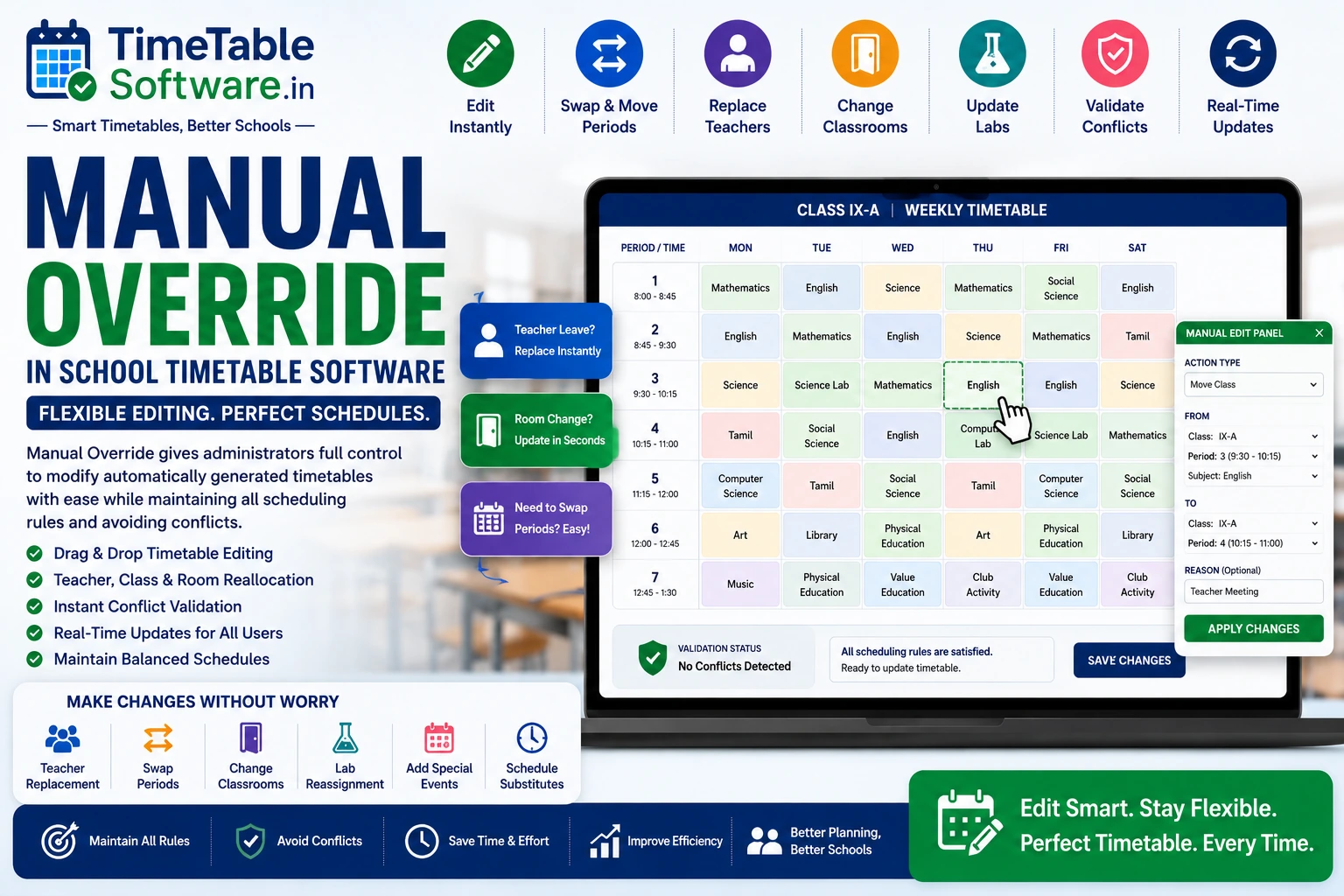
Manual Override allows administrators to manually modify an automatically generated timetable without affecting the remaining schedule. Instead of regenerating the entire timetable, schools can make targeted changes while the software validates every modification against existing scheduling rules.
Why Schools Need Manual Override
Handle Unexpected Events
Quickly respond to teacher leave, emergencies, inspections, and timetable disruptions without rebuilding the complete schedule.
Preserve Existing Timetables
Only the affected timetable entries are modified while the remaining schedule remains unchanged.
Reduce Administrative Effort
Administrators can make targeted timetable changes within minutes instead of recreating the entire timetable.
Maintain Scheduling Accuracy
Every manual update is automatically validated against timetable rules before being saved.
Challenges of Manual Timetable Changes
Common Manual Override Scenarios
Teacher Leave
Replace unavailable teachers for a single period, multiple days, or extended leave without affecting other timetable entries.
Substitute Teacher Assignment
Assign qualified substitute teachers while validating availability and workload limits.
Classroom & Laboratory Changes
Move classes to another available classroom or laboratory whenever maintenance or availability changes.
Special School Events
Adjust timetables for examinations, guest lectures, cultural programs, sports events, inspections, and parent-teacher meetings.
Key Features of Manual Override
Automatic Validation During Manual Editing
Teacher Availability
Checks whether replacement teachers are available before confirming timetable updates.
Resource Validation
Verifies classroom allocation, laboratory availability, and resource usage before applying changes.
Scheduling Rules
Validates subject distribution, teacher workload, double periods, combined classes, combined teachers, and No Gaps Rule automatically.
Instant Conflict Detection
Immediately warns administrators whenever a manual modification introduces timetable conflicts.
Benefits of Manual Override
Maximum Flexibility
Respond quickly to unexpected timetable changes without affecting the complete academic schedule.
Time Saving
Modify only the required timetable entries instead of regenerating the entire timetable.
Conflict-Free Editing
Automatic validation ensures that every manual update complies with scheduling rules before saving.
Efficient Resource Management
Teachers, classrooms, laboratories, and other academic resources remain optimally allocated after timetable modifications.
Improved Administrative Productivity
Reduce manual workload by allowing administrators to perform quick timetable adjustments with minimal effort.
Real-Time Timetable Updates
Updated schedules become immediately available to teachers, students, and administrators.
Ideal For
Why Schools Choose TimeTableSoftware.in
Drag-and-Drop Editing
Edit automatically generated timetables quickly using an intuitive drag-and-drop interface.
Teacher Replacement
Assign substitute teachers instantly while validating availability and workload limits.
Period Swapping
Swap periods between teachers or classes without disturbing the remaining timetable.
Classroom & Laboratory Reassignment
Move classes to available classrooms or laboratories with automatic resource validation.
Automatic Conflict Validation
Checks teacher availability, classroom allocation, laboratory allocation, subject distribution, workload, double periods, combined classes, combined teachers, and No Gaps Rule before saving changes.
Change History
Maintains a complete audit trail including user, date, time, previous values, and updated timetable entries.
Role-Based Permissions
Allows schools to define editing rights for principals, coordinators, department heads, and teachers.
Instant Timetable Updates
Immediately publishes validated timetable changes across the entire school without requiring timetable regeneration.
Multi-Campus Support
Manage manual timetable modifications across multiple campuses from a centralized scheduling platform.
Common Questions
Everything you need to know about this timetable feature.
What is Manual Override in School Timetable Software?+
Manual Override allows administrators to edit automatically generated timetables without recreating the entire schedule. Users can move classes, replace teachers, swap periods, change classrooms, or modify laboratory allocations while the software validates every change.
When should schools use Manual Override?+
Schools use Manual Override for teacher leave, substitute teacher assignments, classroom maintenance, laboratory maintenance, guest lectures, examinations, inspections, sports events, cultural programs, and emergency timetable changes.
Can I replace a teacher without regenerating the timetable?+
Yes. Administrators can replace teachers for individual periods, entire days, or longer durations. The software automatically validates substitute teacher availability and workload before confirming the change.
Does the software validate manual timetable changes?+
Yes. Every manual modification is checked against teacher availability, classroom allocation, laboratory allocation, subject distribution, teacher workload, double periods, combined classes, combined teachers, the No Gaps Rule, and other scheduling constraints.
Can I move practical classes to another laboratory?+
Yes. Practical sessions can be reassigned to another available laboratory. The software validates laboratory availability, seating capacity, equipment requirements, and teacher assignments before applying the update.
Does Manual Override support drag-and-drop editing?+
Yes. Administrators can quickly move classes, swap periods, replace teachers, and update classroom assignments using an intuitive drag-and-drop timetable editor.
Can different users have different editing permissions?+
Yes. Schools can configure role-based permissions. Principals and timetable coordinators may have full editing rights, department heads can manage department schedules, and teachers can be given view-only access.
Is every timetable change recorded?+
Yes. The software maintains a complete audit trail including the user, date, time, previous timetable entry, and updated information for every manual change.
Is Manual Override suitable for all school boards?+
Yes. It supports CBSE, ICSE, State Board, Government, Government Aided, Matriculation, Higher Secondary, International Schools, Colleges, Polytechnic Institutions, Engineering Colleges, and Vocational Training Institutes.
How does Manual Override improve timetable management?+
Manual Override allows schools to respond quickly to unexpected timetable changes, reduces administrative effort, preserves scheduling accuracy, validates conflicts automatically, and ensures uninterrupted academic operations.
Final Thoughts
Manual Override is an essential capability of modern School Timetable Software. While automatic timetable generation creates optimized schedules, real-world situations require flexibility. By allowing administrators to edit timetables, replace teachers, swap periods, reassign classrooms, and manage laboratories with automatic conflict validation, TimeTableSoftware.in provides the perfect balance between intelligent automation and human control for efficient, accurate, and conflict-free timetable management.
Continue Reading
Explore more guides about school timetable software features.
Teacher Availability Management in School Timetable Software | Complete Guide
Learn how teacher availability management helps schools generate conflict-free timetables while respecting teacher schedules.
Part-Time Teacher Management in School Timetable Software | Complete Guide
Manage part-time teachers efficiently using timetable software with subject and availability constraints.
Combined Subject Scheduling in School Timetable Software: A Complete Guide for Indian Schools
Understand combined subject scheduling and how timetable software automates it.
Combined Teacher Scheduling in School Timetable Software: Complete Guide for Indian Schools
Learn how combined teacher scheduling works in automated timetable software.
Combined Class Scheduling in School Timetable Software: Complete Guide for Indian Schools
Learn how combined classes are managed in modern timetable software.
Laboratory Allocation in School Timetable Software: Complete Guide for Indian Schools
Efficient laboratory allocation for Physics, Chemistry, Biology and Computer labs.
Double Period Scheduling in School Timetable Software: Complete Guide for Indian Schools
Automatically schedule double periods without conflicts.
Subject Distribution in School Timetable Software: Complete Guide for Indian Schools
Balanced subject distribution across the week using AI timetable generation.
No Gaps Rule in School Timetable Software: Complete Guide for Indian Schools
Generate timetables with no unnecessary gaps for teachers.
Conflict Detection Engine in School Timetable Software: Complete Guide for Indian Schools
Prevent teacher, classroom and laboratory conflicts automatically.
Automatic Substitute Teacher Scheduling in School Timetable Software: Complete Guide for Indian Schools
Automate substitute teacher allocation instantly.
Class Teacher Uniform Period in School Timetable Software: Complete Guide for Indian Schools
Allocate common periods for class teachers efficiently.
Principal / Vice Principal Uniform Free Periods in School Timetable Software: Complete Guide for Indian Schools
Reserve uniform free periods for school administration.
Conditional P.T. Periods in School Timetable Software: Complete Guide for Indian Schools
Configure PT periods using advanced timetable rules.
Equal Distribution of Working Periods in Both Sessions: Complete Guide for School Timetable Software
Balance teacher workload across morning and afternoon sessions.
Fixed Practical Periods in School Timetable Software: Complete Guide for Indian Schools
Schedule practical sessions at fixed periods automatically.
External Teacher Periods in School Timetable Software: Complete Guide for Indian Schools
Manage visiting and external teachers efficiently.
Free Period Equal Distribution in Both Sessions: Complete Guide for School Timetable Software
Distribute teacher free periods equally throughout the day.
No Continuous Working Load in School Timetable Software: Complete Guide for Indian Schools
Prevent continuous teaching load using timetable constraints.
Timetable Reports in School Timetable Software: Complete Guide for Indian Schools
Generate printable teacher, class and school timetable reports.