School Timetable Reports in School Timetable Software
Creating an accurate timetable is only the beginning of efficient school scheduling. Schools also need professional timetable reports for teachers, students, parents, administrators, and management. TimeTableSoftware.in automatically generates teacher-wise, class-wise, workload, laboratory, classroom, and institution-wide timetable reports in printable and digital formats. Every report updates instantly whenever the timetable changes, ensuring accurate information is always available for daily operations.
Why Schools Need Timetable Reports
Different stakeholders require different views of the timetable. Teachers need personal schedules, students require class timetables, principals need institution-wide reports, and administrators require workload and planning reports. Automatic report generation eliminates manual work, reduces errors, and keeps every report synchronized with the latest timetable.
Core Timetable Reports
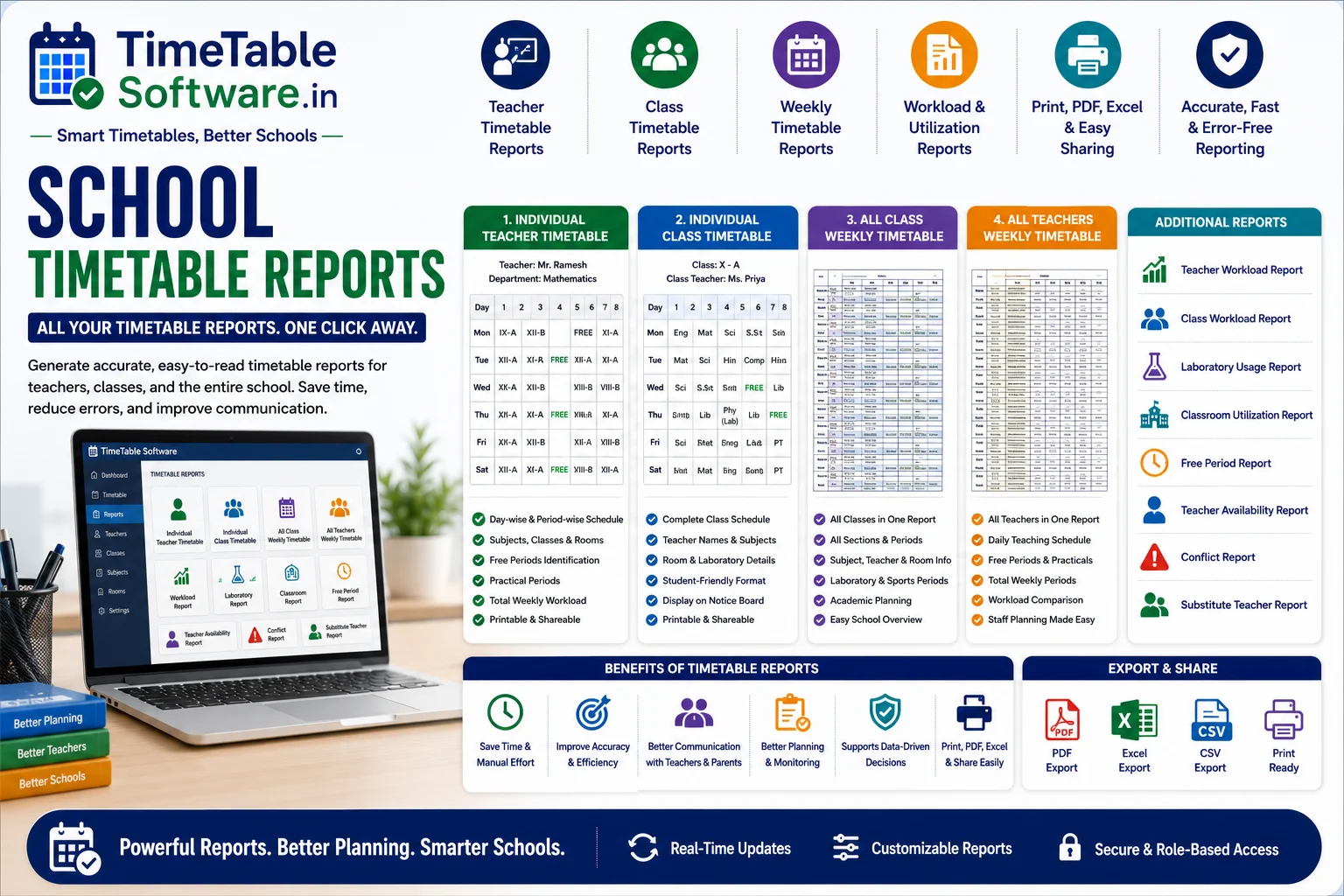
Individual Teacher Timetable
Displays a complete weekly teaching schedule including subjects, classes, room numbers, practical sessions, free periods, and total workload for a single teacher.
Individual Class Timetable
Shows the complete timetable for a class or section with subjects, teachers, classrooms, laboratory periods, and daily schedules.
All Class Weekly Timetable
Provides a consolidated weekly timetable for every class, helping management monitor academic planning across the institution.
All Teachers Weekly Timetable
Displays the weekly schedules of all teachers in one report, making workload comparison and staff planning easier.
Additional Reports Available
Report Features
One-Click Report Generation
Generate all timetable reports instantly without manual preparation.
Print-Friendly Layouts
Optimized for A4 Portrait, A4 Landscape, and Legal-size printing with professional formatting.
PDF, Excel & CSV Export
Export reports in multiple formats for sharing, printing, archiving, and external analysis.
Search & Filtering
Quickly locate reports by teacher, class, department, subject, classroom, laboratory, or day.
Key Features of Timetable Reports
Benefits of Automatic Timetable Reports
Saves Administrative Time
Generate professional reports in seconds instead of preparing them manually.
Reduces Errors
Automatic report generation eliminates manual copying mistakes and maintains consistency.
Improves Communication
Teachers, students, parents, and administrators always receive accurate and updated schedules.
Better Academic Planning
Management gains complete visibility into teacher workloads, class schedules, and institutional planning.
Instant Timetable Updates
Whenever the timetable changes, every related report is automatically updated.
Supports Large Institutions
Efficiently manages reports for hundreds of teachers, classes, departments, and multiple campuses.
Ideal For
Why Schools Choose TimeTableSoftware.in
Comprehensive Reporting
Generate teacher, class, workload, laboratory, classroom, availability, conflict, and substitution reports from a single platform.
Professional Print Layouts
Reports are optimized for printing and easy classroom display without additional formatting.
Role-Based Access
Teachers, administrators, principals, and management access only the reports relevant to their responsibilities.
Multiple Export Options
Export timetable reports as PDF, Excel, or CSV for sharing, archiving, and analysis.
Real-Time Synchronization
Every timetable modification automatically updates all related reports across the system.
Advanced Search
Locate timetable information instantly using teacher, class, department, subject, or classroom filters.
Multi-Campus Support
Generate campus-specific reports or consolidated reports for institutions operating multiple branches.
Mobile-Friendly Access
View reports conveniently on desktops, laptops, tablets, and mobile devices.
Scalable for Large Schools
Handles thousands of students, hundreds of teachers, and multiple academic departments efficiently.
Common Questions
Everything you need to know about this timetable feature.
What timetable reports are available?+
The software generates Individual Teacher Timetables, Individual Class Timetables, Weekly Teacher Timetables, Weekly Class Timetables, Teacher Workload Reports, Laboratory Reports, Classroom Reports, Conflict Reports, and many more.
Can timetable reports be printed?+
Yes. All reports are designed with print-friendly layouts and support A4 Portrait, A4 Landscape, and Legal-size printing.
Can reports be exported?+
Yes. Reports can be exported as PDF, Microsoft Excel, and CSV files for sharing, printing, and analysis.
Are reports updated automatically after timetable changes?+
Yes. Whenever the timetable is modified, every related report is automatically updated to reflect the latest schedule.
Can teachers access only their own timetable?+
Yes. Role-based access ensures teachers can view only their own schedules while administrators have broader access based on permissions.
Do reports include laboratory and classroom information?+
Yes. Teacher and class timetable reports can include classroom numbers, laboratory details, sports facilities, and other allocated resources.
Does the software support multi-campus reporting?+
Yes. Schools with multiple campuses can generate individual campus reports or consolidated institution-wide reports.
Is this suitable for all school boards?+
Yes. The reporting module supports CBSE, ICSE, State Board, Government, Government Aided, Matriculation, Higher Secondary, International Schools, Colleges, Polytechnic Institutions, and Coaching Centres.
Can administrators search and filter reports?+
Yes. Reports can be filtered by teacher, class, department, subject, classroom, laboratory, day, and academic section for quick access.
How do timetable reports improve school operations?+
Timetable reports automate schedule sharing, reduce administrative effort, improve communication, support academic planning, provide real-time updates, and simplify school timetable management.
Final Thoughts
School Timetable Reports are an essential part of modern School Timetable Software. By automatically generating teacher-wise, class-wise, workload, laboratory, classroom, and institution-wide reports with real-time updates, print-ready layouts, and multiple export options, TimeTableSoftware.in helps schools improve communication, reduce administrative work, and manage academic schedules efficiently.
Continue Reading
Explore more guides about school timetable software features.
Teacher Availability Management in School Timetable Software | Complete Guide
Learn how teacher availability management helps schools generate conflict-free timetables while respecting teacher schedules.
Part-Time Teacher Management in School Timetable Software | Complete Guide
Manage part-time teachers efficiently using timetable software with subject and availability constraints.
Combined Subject Scheduling in School Timetable Software: A Complete Guide for Indian Schools
Understand combined subject scheduling and how timetable software automates it.
Combined Teacher Scheduling in School Timetable Software: Complete Guide for Indian Schools
Learn how combined teacher scheduling works in automated timetable software.
Combined Class Scheduling in School Timetable Software: Complete Guide for Indian Schools
Learn how combined classes are managed in modern timetable software.
Laboratory Allocation in School Timetable Software: Complete Guide for Indian Schools
Efficient laboratory allocation for Physics, Chemistry, Biology and Computer labs.
Double Period Scheduling in School Timetable Software: Complete Guide for Indian Schools
Automatically schedule double periods without conflicts.
Subject Distribution in School Timetable Software: Complete Guide for Indian Schools
Balanced subject distribution across the week using AI timetable generation.
No Gaps Rule in School Timetable Software: Complete Guide for Indian Schools
Generate timetables with no unnecessary gaps for teachers.
Conflict Detection Engine in School Timetable Software: Complete Guide for Indian Schools
Prevent teacher, classroom and laboratory conflicts automatically.
Manual Override in School Timetable Software: Complete Guide for Indian Schools
Modify generated timetables manually while maintaining consistency.
Automatic Substitute Teacher Scheduling in School Timetable Software: Complete Guide for Indian Schools
Automate substitute teacher allocation instantly.
Class Teacher Uniform Period in School Timetable Software: Complete Guide for Indian Schools
Allocate common periods for class teachers efficiently.
Principal / Vice Principal Uniform Free Periods in School Timetable Software: Complete Guide for Indian Schools
Reserve uniform free periods for school administration.
Conditional P.T. Periods in School Timetable Software: Complete Guide for Indian Schools
Configure PT periods using advanced timetable rules.
Equal Distribution of Working Periods in Both Sessions: Complete Guide for School Timetable Software
Balance teacher workload across morning and afternoon sessions.
Fixed Practical Periods in School Timetable Software: Complete Guide for Indian Schools
Schedule practical sessions at fixed periods automatically.
External Teacher Periods in School Timetable Software: Complete Guide for Indian Schools
Manage visiting and external teachers efficiently.
Free Period Equal Distribution in Both Sessions: Complete Guide for School Timetable Software
Distribute teacher free periods equally throughout the day.
No Continuous Working Load in School Timetable Software: Complete Guide for Indian Schools
Prevent continuous teaching load using timetable constraints.