Teacher Availability Management in School Timetable Software
Creating a school timetable becomes increasingly difficult when teachers have different working hours, administrative responsibilities, meetings, examination duties, and subject allocations. One unavailable teacher can affect multiple classes and create scheduling conflicts across the entire school. Modern School Timetable Software solves this problem through Teacher Availability Management, allowing schools to define when each teacher is available before timetable generation. The scheduling engine automatically respects these rules, reducing manual adjustments and preventing timetable clashes.
What is Teacher Availability Management?
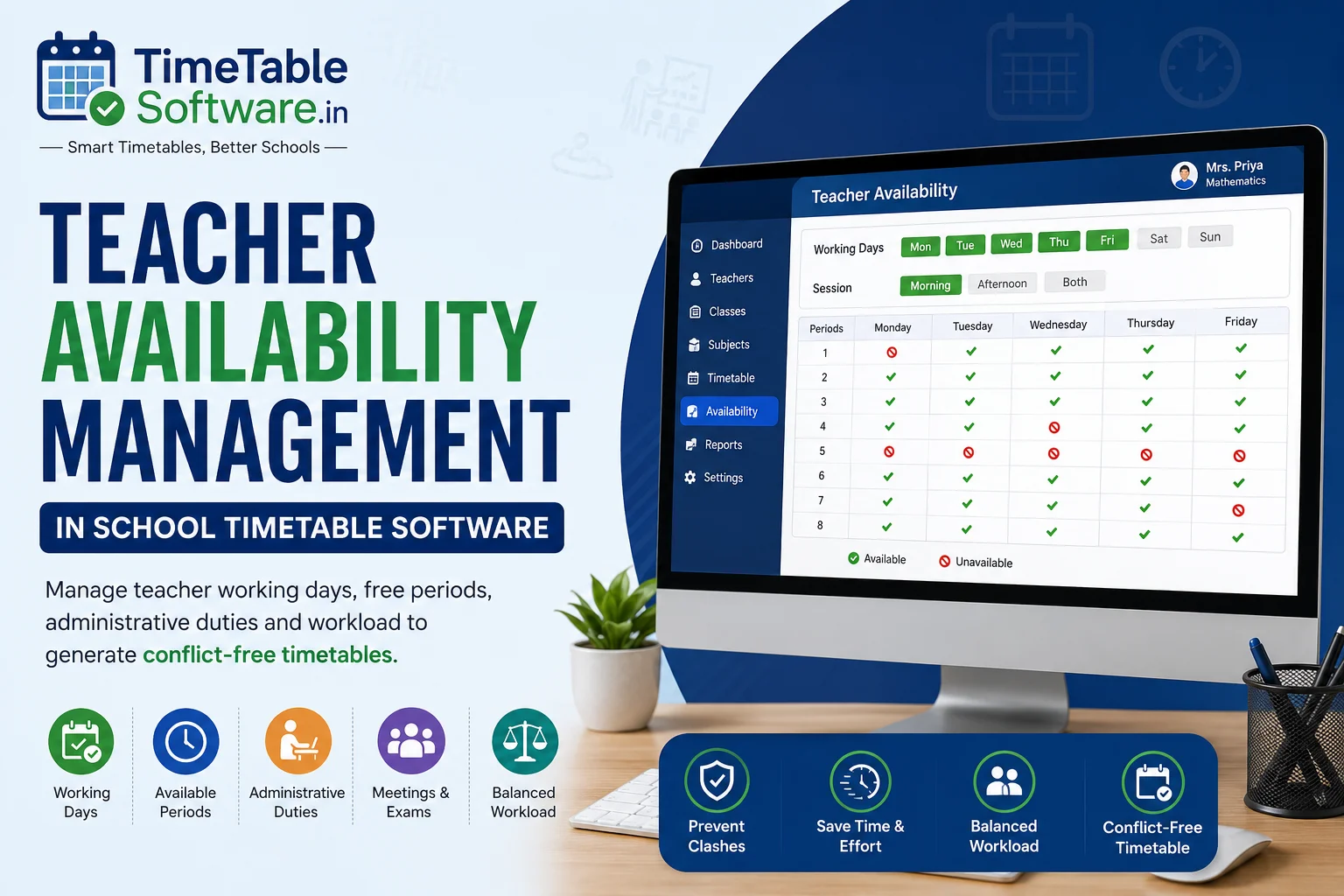
Teacher Availability Management allows schools to specify when individual teachers are available before timetable generation. The scheduling engine checks every availability rule before assigning any teaching period.
Why Teacher Availability Matters
Without proper availability rules, schools often face timetable conflicts that require repeated manual adjustments.
Common Teacher Availability Scenarios
Full-Time Teachers
Available throughout the week.
Teachers with Administrative Duties
Reserved periods for meetings, student counselling, administration, and school management responsibilities.
Teachers Handling Multiple Schools
Available only on selected working days such as Monday, Wednesday, and Friday.
External Faculty
Available only during predefined sessions or selected teaching periods.
Teacher Availability Rules Supported
Benefits of Automatic Teacher Availability Management
Prevent Teacher Clashes
The software never assigns a teacher to two classes simultaneously.
Reduce Manual Work
Administrators no longer need to manually verify every teacher's schedule.
Balanced Workload
Teaching periods are distributed evenly throughout the week.
Faster Timetable Generation
Generate conflict-free timetables within minutes instead of spending days manually preparing schedules.
Example of Teacher Availability Scheduling
Example Scenario
- Period 1
- Period 5
The timetable generator automatically avoids assigning classes during unavailable periods.
Who Can Benefit?
Why Choose TimeTableSoftware.in?
Teacher Availability
Configure availability for every teacher before timetable generation.
Administrative Duties
Reserve periods for meetings, counselling, and school administration.
Free Period Planning
Automatically balance teacher free periods throughout the week.
Conflict Detection
Prevent timetable clashes before schedules are finalized.
Manual Override
Modify generated timetables whenever required.
Automatic Timetable Generation
Generate complete school timetables within minutes.
Teacher Workload Balancing
Distribute teaching load fairly across teachers.
Real-Time Validation
Instantly detect scheduling issues while editing the timetable.
Common Questions
Everything you need to know about this timetable feature.
Can I block certain periods for a teacher?+
Yes. Administrators can block specific periods for meetings, examinations, counselling, administrative work, or any other school activity. The timetable generator never schedules classes during blocked periods.
Can teachers work only on selected days?+
Yes. Schools can define exact working days for every teacher, making the feature ideal for part-time teachers, visiting faculty, and teachers working across multiple schools.
Can principals and senior administrators have reserved periods?+
Yes. Principals, Vice Principals, Coordinators, and Heads of Departments can reserve periods for meetings, supervision, inspections, counselling, and administrative work.
Can the software prevent teacher clashes?+
Yes. Before assigning a class, the scheduling engine checks teacher availability, classroom allocation, laboratory availability, and existing assignments to prevent conflicts.
Can teacher availability be modified at any time?+
Yes. Administrators can update availability whenever required due to leave, training, examinations, or timetable revisions.
Does Teacher Availability Management improve timetable generation speed?+
Yes. Since availability rules are applied automatically, manual corrections are greatly reduced, allowing schools to generate conflict-free timetables much faster.
Is Teacher Availability Management suitable for all schools?+
Yes. It is suitable for CBSE, ICSE, State Board, Matriculation, Higher Secondary, International Schools, Colleges, Polytechnic Institutions, and Coaching Centres.
Can the software handle temporary teacher unavailability?+
Yes. Teachers can be temporarily marked unavailable due to leave, examinations, workshops, training, sports events, or official duties.
How does Teacher Availability Management benefit schools?+
It helps schools generate practical, conflict-free timetables, reduces manual work, balances teacher workloads, prevents double booking, and improves overall scheduling efficiency.
Final Thoughts
Teacher availability is one of the most important scheduling constraints in any school. By defining availability before timetable generation, schools can create practical, conflict-free schedules while reducing manual work, improving teacher satisfaction, and increasing administrative efficiency.
Continue Reading
Explore more guides about school timetable software features.
Part-Time Teacher Management in School Timetable Software | Complete Guide
Manage part-time teachers efficiently using timetable software with subject and availability constraints.
Combined Subject Scheduling in School Timetable Software: A Complete Guide for Indian Schools
Understand combined subject scheduling and how timetable software automates it.
Combined Teacher Scheduling in School Timetable Software: Complete Guide for Indian Schools
Learn how combined teacher scheduling works in automated timetable software.
Combined Class Scheduling in School Timetable Software: Complete Guide for Indian Schools
Learn how combined classes are managed in modern timetable software.
Laboratory Allocation in School Timetable Software: Complete Guide for Indian Schools
Efficient laboratory allocation for Physics, Chemistry, Biology and Computer labs.
Double Period Scheduling in School Timetable Software: Complete Guide for Indian Schools
Automatically schedule double periods without conflicts.
Subject Distribution in School Timetable Software: Complete Guide for Indian Schools
Balanced subject distribution across the week using AI timetable generation.
No Gaps Rule in School Timetable Software: Complete Guide for Indian Schools
Generate timetables with no unnecessary gaps for teachers.
Conflict Detection Engine in School Timetable Software: Complete Guide for Indian Schools
Prevent teacher, classroom and laboratory conflicts automatically.
Manual Override in School Timetable Software: Complete Guide for Indian Schools
Modify generated timetables manually while maintaining consistency.
Automatic Substitute Teacher Scheduling in School Timetable Software: Complete Guide for Indian Schools
Automate substitute teacher allocation instantly.
Class Teacher Uniform Period in School Timetable Software: Complete Guide for Indian Schools
Allocate common periods for class teachers efficiently.
Principal / Vice Principal Uniform Free Periods in School Timetable Software: Complete Guide for Indian Schools
Reserve uniform free periods for school administration.
Conditional P.T. Periods in School Timetable Software: Complete Guide for Indian Schools
Configure PT periods using advanced timetable rules.
Equal Distribution of Working Periods in Both Sessions: Complete Guide for School Timetable Software
Balance teacher workload across morning and afternoon sessions.
Fixed Practical Periods in School Timetable Software: Complete Guide for Indian Schools
Schedule practical sessions at fixed periods automatically.
External Teacher Periods in School Timetable Software: Complete Guide for Indian Schools
Manage visiting and external teachers efficiently.
Free Period Equal Distribution in Both Sessions: Complete Guide for School Timetable Software
Distribute teacher free periods equally throughout the day.
No Continuous Working Load in School Timetable Software: Complete Guide for Indian Schools
Prevent continuous teaching load using timetable constraints.
Timetable Reports in School Timetable Software: Complete Guide for Indian Schools
Generate printable teacher, class and school timetable reports.